How to create a Web Questionnaire Form in 5 minutes?

by Ashwin on January 19, 2009

Have you ever tried to create a Web Questionnaire Form?  If yes, then you know the pain in creating, maintaining, sharing and gathering the results.  But Google Docs makes life easier through its Forms.  In this post, you can find out how to use Forms and create a Questionnaire is 5 minutes!

Create a Web Questionnaire Form
googledocsforms_1

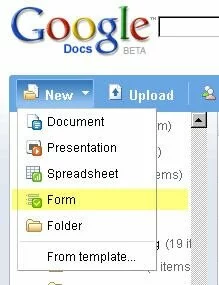
Go to http://docs.google.com and login with your Google username.  Select to Create a New Form.

A Form is a questionnaire page that can host a series of questions with various options to answer them.  Prepare questions beforehand and use the forms to design the questionnaire.


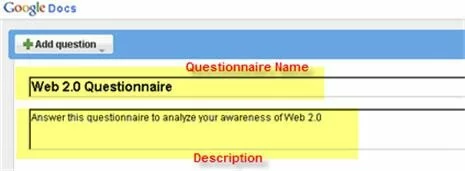
Give a Name for your form and also a Description for end users to identify the objective.
googledocsforms_2

Then you can start adding questions using the Add Question button at the top.

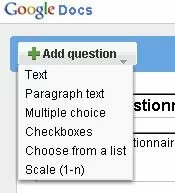
While adding questions you can choose to make it mandatory and also choose from the following answer formats:
googledocsforms_3

Text and Paragraph Text can be useful for subjective questions.  Multiple Choice provides radio buttons and Checkboxes provide multiple options to choose from.  Scale can be used to rate a question and List can be used to provide a range of options.


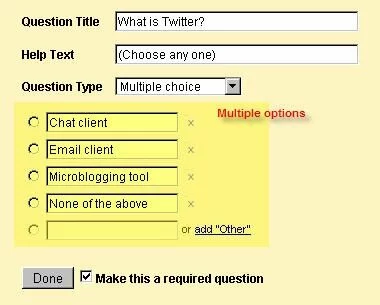
Following is an example on how a question with multiple choices can be created.
googledocsforms_4

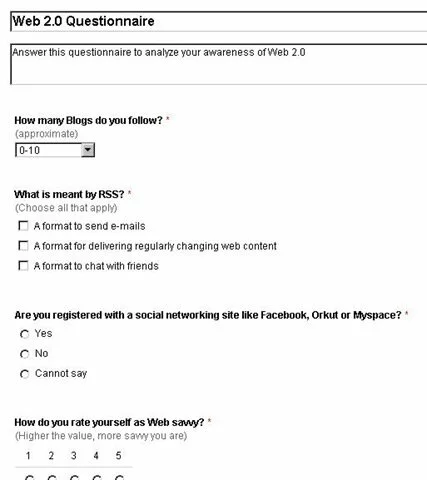
Here is how a sample Web Questionnaire form looks like.  You can easily rearrange questions by dragging and dropping them in appropriate locations.  Also Edit and Remove are highly intuitive.
googledocsforms_5

You can also Edit the Confirmation message that is displayed on form submit.  To do this, select More actions > Edit Confirmation on the right top corner.

Share the Questionnaire

Once created, you can share the questionnaire with users in one of the following ways.

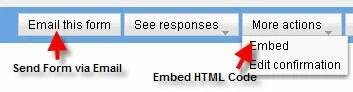
  • Email the form by selecting Email this Form on the right top corner
  • Embed the form by selecting More actions > Embed and copying the HTML code on the required web page
  • Copy the URL of the Form from bottom of the page and sending it through Email or Chat
googledocsforms_6

googledocsforms_7

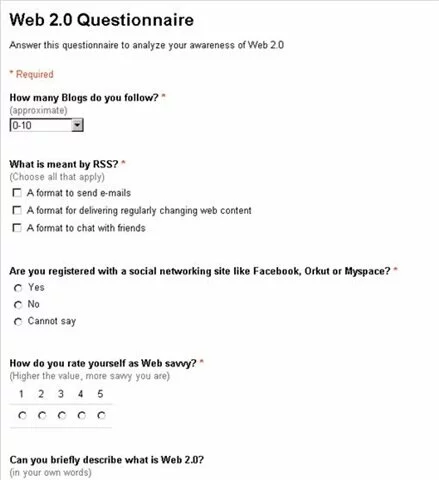
Following is how the Form looks when accessed using the URL.  Isn’t it so neat and intuitive?
googledocsforms_8

You can access the sample form I had created at this URL – http://spreadsheets.google.com/viewform?key=pUehfq3lTkylf0zRfaDT3QQ

Gather Results

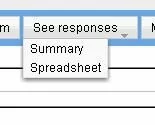
Once users start answering the questions, you can view the responses either as a Summary with detailed report represented using Charts or in a Spreadsheet.
googledocsforms_9

So you never have to manually gather responses and arrive at the results.

Thus, Google Docs Forms greatly simplifies Web Questionnaire creation, sharing and gathering results.  It is highly simple and very intuitive, even for non-geeks.

If you find this useful, consider sharing it with others using the Share This link below.

Subscribe for more such posts at Blogaroo today!

{ 22 comments… read them below or add one }

Busby SEO Test January 30, 2009 at 7:38 am

Thanks for your info. I have to try this for my questionnaire form. Usually i just use Microsoft Word and send it to our customers

ashwin_c January 30, 2009 at 10:33 am

@Busby SEO Test
Thanks. Google forms is much robust and easy to develop than MS Word. Also you can track the responses with great ease.

nipple toys July 8, 2009 at 6:09 am

As minimal as 5 minutes? Cool! Just subscribed, looking forward to a great experience there and spread the love to my online buddies! :)

ashwin_c July 8, 2009 at 6:18 am

Thanks a lot for the feedback! Greatly appreciated. I am sure you will not be disappointed.

Regards,
Ashwin

xristos x. July 21, 2009 at 7:38 am

thank you.. Very helpful and simple written.

ashwin_c July 21, 2009 at 7:41 am

Thanks xristos. Nice to know that it was helpful. Keep visiting often for more useful stuff.

Regards,
Ashwin

Martine October 27, 2009 at 8:12 am

Can you let me know if it is possible to have the layout of the questionnaire adapted ? I want for example to ask their address in a typical address format and not one question at a time. Is that possible ?

Martine October 27, 2009 at 8:13 am

Can you tell me if it is possible to change the layout of the questionnaire. I want for example to ask their address in a typical address layout and not one question at a time.

Ashwin / Thoughts Unlimited October 27, 2009 at 10:59 pm

Hi Martine,

When you create a questionnaire, there is a question type named – Grid. When you choose that, there can be multiple fields to enter composite data – something like an address.

Let me know if that helps you.

renata November 15, 2009 at 5:29 am

I want to add pictures on the questionnaire form, what should I do?

Ashwin / Thoughts Unlimited November 16, 2009 at 10:52 am

Martine,

Sorry for the late reply. I didn't quiet get your question. Do you want a group of fields under a single label or do you want multiple fields logically grouped together (this can always be done)?

Ashwin / Thoughts Unlimited November 16, 2009 at 10:53 am

Unfortunately there is no possibility to add custom images or branding to the forms. In such cases you might want to go for premium paid services like http://www.wufoo.com

renata November 16, 2009 at 3:49 pm

Thank you Ashwin for your reply.

I found a website where i can add images to the survey and it is for free :)
http://www.thesistools.com

Ashwin / Thoughts Unlimited November 16, 2009 at 9:22 pm

Martine,

Sorry for the late reply. I didn't quiet get your question. Do you want a group of fields under a single label or do you want multiple fields logically grouped together (this can always be done)?

Ashwin / Thoughts Unlimited November 16, 2009 at 9:23 pm

Unfortunately there is no possibility to add custom images or branding to the forms. In such cases you might want to go for premium paid services like http://www.wufoo.com

renata November 17, 2009 at 2:19 am

Thank you Ashwin for your reply.

I found a website where i can add images to the survey and it is for free :)
http://www.thesistools.com

nancy March 12, 2010 at 7:12 am

Hey Great! although i use Google documents but did not know anything about google forms…thanks for publishing.Sample Questionnaire

Ashwin / Thoughts Unlimited March 12, 2010 at 1:50 pm

Thanks and glad it helped :)

gala April 1, 2010 at 3:02 pm

That is super grate, thank you!

gala April 1, 2010 at 8:32 pm

That is super grate, thank you!

noosheen May 14, 2010 at 9:34 pm

i have created a questionnaire but when i click on the link the submit button is not available :-(

Bose Search2010 August 4, 2010 at 4:13 am

Cool one! thanks to google it has many things in it..but few people know them. Thanks for sharing, i have already created a questionnaire. Very helful.

Business Questionnaire

Leave a Comment

{ 3 trackbacks }

Previous post:

Next post: